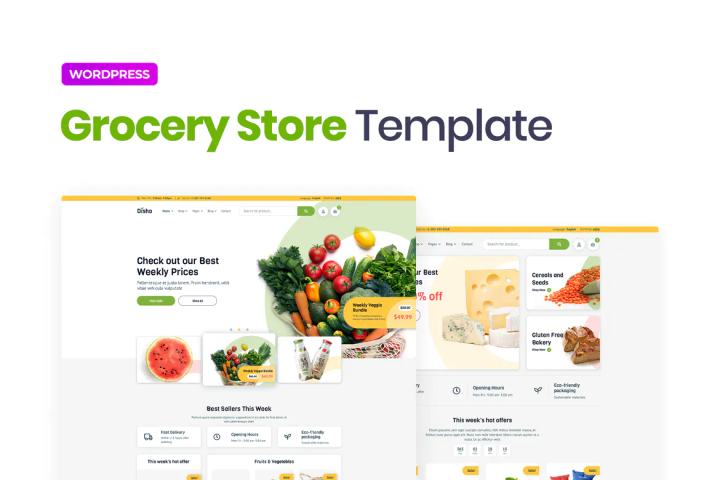
Disho — Template Kit for Elementor
Included with the product:
- Instant download
- Dashboard access
Product description
Disho is a colorful and modern WordPress mall for the Elementor Builder. It is perfectly suitable for online food markets, merchandise, dairy farms or cheese, vineyards, ecological products, sports nutrition, etc. In addition, these pages are universal for any store site model. The Disho model includes 3 incredible initial pages, 3 store pages, various product cards, shopping cart, page on, contact page, blog. The model consists of different bright advertising banners and “Call to Action” blocks to attract the attention of customers. Disho was made with good taste with sweet and suitable purchases


Disho was carefully developed by an experienced designer with great attention to details, flexibility and performance, specifically developing unique WordPress-based sites. This model was created using Elementor and Elementor Pro and can easily be edited on Elementor and is compatible with most themes. The import of the model of some elements and features requires the update of Elementor Pro.
Pages and layouts
- The beginning 1
- The beginning 2
- The beginning 3
- About
- The shop 1
- The Shop 2
- The shop 3
- The unique product
- I say blog
- I have a unique post.
- 404 errors
- Frequently Asked Questions
- Contact us
- Results of the research
Sections
- The CTA Banner
- Blog Archive 3 Col.
- Section Category Side Bar Style 1
- Categories in top
- Category: Style 2 Links
- Contact with style 1
- Contact with Style 2
- The CTA Banner
- CTA Banners 1 style
- CTA Banners Style 2
- CTA Section Sliding Control
- Section Resource Box
- Resources of section Columns Text blocks
- Icon box of resources
- Section inverter boxes with rolling effect
- Section head blocks with main image
- The Hero of Section Head Sliding Controls
- Hero of the head of the section with animation Lottie
- Hero Sliders 2 Col
- Instagram Gallery Without Space
- Instagram Gallery with Space
- Items of Section 1 Style
- Items of Section 2 Style
- Items of Section Style 3
- Items of section Style 4
- The logos of section
- Title of the page of the section with navigation trails
- Product Columns Image with Description
- Products with discount banner
- Products with special proposal
- Blog of the Side Bar
- Banner of the section registration form
- Section text block with image 2 col
- The title of the section with regressive count
- Title of Sections 3 Col
- Title of Sections
- Video of the section
- Pop-up of contact
- The CTA
- Roofed Disho
- The menu
- The left menu of the cell phone
- The price seat
Resources of the DISHO model
- Global Theme Styles Included
- 57 elementary models
- Perfect Pixel Design
- 100% fluid responsive
- Clean and simple style
- Easy to use and customize
- All major browsers supported by Chrome, Firefox, Safari, Edge, Opera
- Free Google sources used
- Icons provided by Font Awesome 5 Pro
- The Daltonism Simulator
- 100% SEO friendly
- Perfect for Elementor Pro
- Fast, dedicated and professional support
The update of the Elementor Pro is required for some models and features (not included)
- How to use the model kits: ** This is not a WordPress theme. The model kits contain only the design data for the Elementor and are installed using the Elements package plugin for WordPress or directly through the Elementor.
1. Download the file from your Envato kit and don't discompact it. If you use the Safari browser, it may be necessary to ensure that "Open Safe Files After Download" is disabled in the browser preferences. 2. Go to Settings > Permalinks and make sure the post name is selected. 3. Go to appearance > Themes > Add New and make sure Hello Elementor is installed and activated. This will require you to install the Elementor if you haven't done it. 4. Go to Plugins and check if the Elementor and Envato Elements are installed and in the latest version. If your Kit requires the Elementor Pro, it should be 5. Go to Elements > Installed Kits and click on Upload Template Kit Zip (or click on your kit to view it) 6. Check the orange banner on the top and click on Install Requirements to load the plugins used by the kit. https://envato.d.pr/ughD8Q 7.Click Import in the Global Kit Styles first.This will set up the site settings.8.Click Import in one model each time in the order shown.They are stored in the Elementor in Models > Save Models and are reused from here.
Creating pages
Go to Pages, create a new page and click Edit with the Elementor 2. Click on the grinding icon in the building's lower left corner to view the page settings and select the Full Width Elementor and hide the page title 3. Click on the gray folder icon to access the guide My models and then Import the page you want to customize.
If you have the Elementor Pro, the heads and headpots will be customized in Models > Theme Builder.
The detailed guide: https://help.market.envato.com/hc/en-us/articles/900000842846-How-to-use-the-Envato-Elements-WordPress-Plugin-v2-0
To get more support, go to the Elementor menu > Get help in WordPress.
Important about the download
Check the format and requirements in the description. Back up your site before installing and use these files on sites you manage.
Related products
Other products you might find useful.
ZipNook — Elementor Templates Kit for Laptop Store

Creavision — Elementor Pro Templates Kit for Digital Marketing Agency

Intelion — Elementary Template Kits of Artificial Intelligence Services

Quarionix — Elementor Models Kit for IT Services

DriveSkill — AutoSchool and Driving School Website Template
Roxride — Elementor Template Kit for Car Rental and Car Reservations

Temotive — Template Kit Elementor of Psychology and Counseling