Without the plugin
1Find and download the ZIP to your computer
2Open wp-admin and upload the file again
3Repeat the process for every version and website

Connect your site to the Pack de Sites library, find products included in your plan and receive new versions directly in wp-admin.
2 new versions available
Every manual update interrupts your workflow and multiplies the work when you manage several websites. The Pack de Sites plugin brings everything into the dashboard.
Your authorized catalog appears inside WordPress. When Pack de Sites releases a new version, you get a notice and update it from the dashboard.
Less manual work
No hunting for links or downloading and re-uploading every ZIP after an update.
When Pack de Sites releases a higher version, the notice appears in the native WordPress dashboard.
Search authorized plugins and themes, choose an available file and install it without leaving the dashboard.
The library only shows WordPress Plugins and WordPress Themes authorized for your Business account.
Each installation is tied to an authorized domain and uses its own credentials and temporary downloads.
Available inside wp-admin
Find plugins and themes included in your plan, install new tools and receive released versions without downloading and uploading ZIP files.
These products and everything in the Pack de Sites WordPress catalog.
Get the Business PlanGuided setup
Connect once. The dashboard handles the checks from then on.
The feature is available while your Business subscription is active.
On the API Keys page, create a key, add the domain and generate an activation code.
Install the official plugin, enter the API key and code, and connect it from wp-admin.
Search the catalog, install new products and apply available versions with one click.
The right kind of automation
The catalog and new-version notices sync automatically. Installation only starts after an administrator confirms it, giving you control over production websites.
Built for people who manage websites
Connect up to 10 of your own or your clients' websites and manage everything through your Business account. Install plugins and themes, receive new versions, and reassign access whenever needed.
See it in action
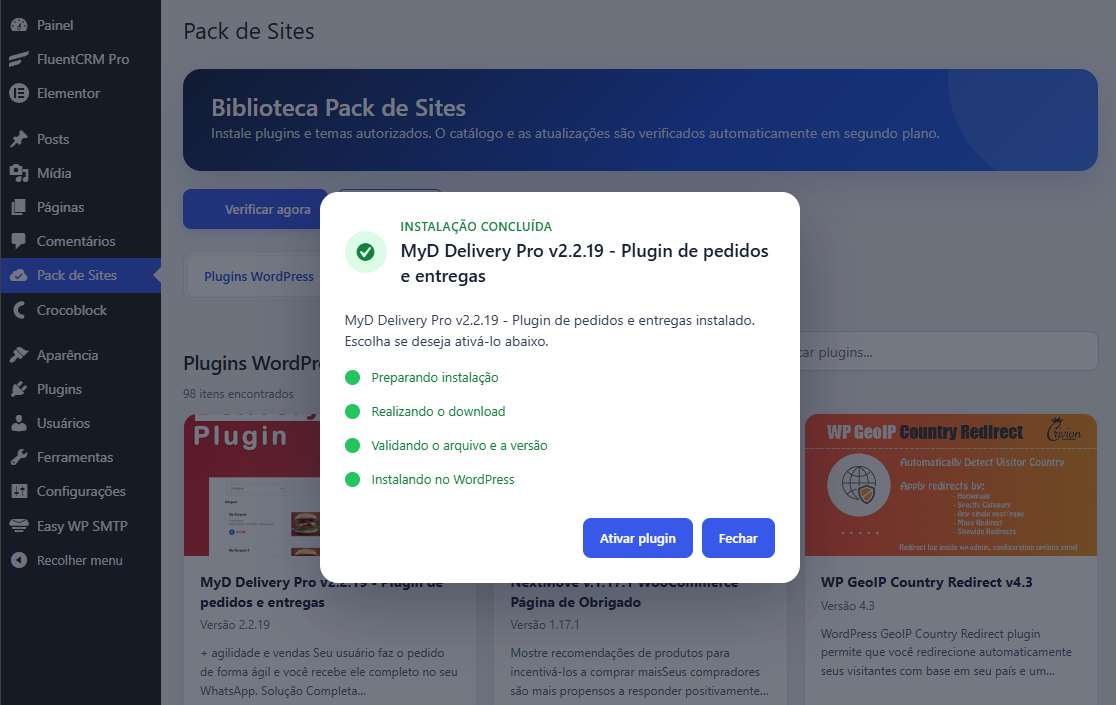
This is a real screenshot of the Pack de Sites plugin completing an installation in wp-admin. From download to file validation, the process stays visible and ends with the option to activate the plugin.
Frequently asked questions
Ready to simplify your workflow?
Get the Business Plan and connect up to 10 domains to install and update plugins and themes with far less manual work.
See Business Plans