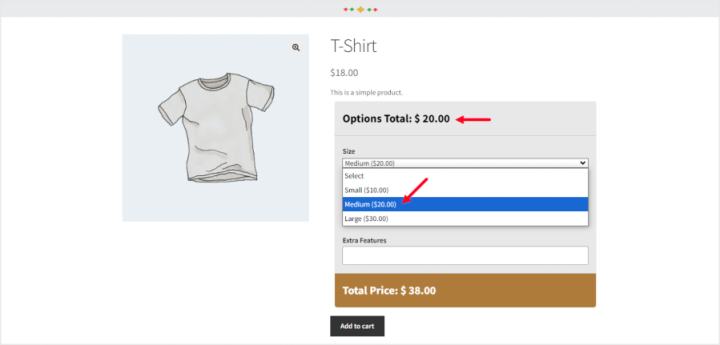
Extra Custom Product Options for WooCommerce v4.0.0
Included with the product:
- Instant download
- Dashboard access
Product description
Use custom product add-ons to create free or paid product options using 18 types of fields. Create conditional fields to display/ocult fields based on customer choices.
- Add multiple options to product pages
- 18 types of fields to create extra product options
- Adding colour and text samples
- Show or hide any fields based on user entries using conditional logic
- Separate each field with a line in the frontend using the separator
- Option to select the selected option default to select, option button, color and text sample field
- Class the order of the options created for the selection box, option button, color and text sample field
- Customize the product options form, such as color, text, text weight, etc.
- Showing selected product options with car items or in a pop-up
- Create multiple rules for product options
- Easy management of rules from the back office
- Classify the order of options
- Apply each rule to specific products or categories
- Set the price for each field
- Rules of import/export product options
- Duplicate the existing rule
- View the rules created
Add additional custom product options and add-ons with 18 field types
Plug-in of extra options of WooCommerce products It allows you to create several customized options for products based on the customer’s needs.
For example, if you are selling a computer, customers have different requirements that customize, such as RAM, hard drives, LCD screen sizes, USBs, mouse types, etc. These comprehensive options cannot be offered with standard variations.
Products of WooCommerce help you create product options using 18 field types, such as text field, text area, option buttons, selection box, multiple selection box, selection box, file upload, color sample, text sample etc.
You can set the price for each field or provide it for free. define conditions to display or hide fields based on the user's input and choice. You can attach options to several products or categories at the same time to save time. Customize the layout of options to combine them with the theme of your site.
Details of the characteristics:
Add several additional product options
The plug-in of extra options of WooCommerce products It allows you to add as many options you want with the help of different types of fields.

Use text and color sample
The WooCommerce product plug-in also allows you to create text and color samples to improve the visibility of product variations.

18 types of fields
The WooCommerce custom product field plug-in allows 18 types of fields to create product options such as text field, text area, option buttons, selection box, multiple selection box, selection box, file upload, color sample, text sample and more.

Set a price for each field
The extension of WooCommerce’s extra product options It allows to increase the cost of the product by setting a price for the fields.

Conditional / Trusted Fields
You can create conditional fields that show or hide the specific fields based on the user's entry or choice.

Custom Option button images
You can also display personalized images to optional buttons that will make it easier for customers what they’re going to choose.

Attribute to various products or categories
The Plug-in Additional Products of WooCommerce It saves your time as you can attach options to various products or categories.

Create a number of rules
You can add several rules to product options, which helps to create different options for specific products.

Classify the order of options
Additional product options for the WooCommerce plug-in allows you to classify the order of the product options created.

2 Ways to Show Options on the Car Page
The Plug-in Products of WooCommerce It allows you to display the selected options simply with the car items.

You can also activate the “Show details” button on the car page, which shows additional options in a pop-up when you click.


Rules of import/export product options
You can also export the rules of product options created by you into a CSV file for backup. You can import it to another site, which means you don’t need to create the rules again.

Duplicate the rule
With the WooCommerce extra product add-ons plug-in, you can make a copy of any rule with the rule duplication feature.

The advantages
- Additional options help you sell customizable products.
- Increase the demand value by creating options.
- Increases the conversion rate.
- It improves the user experience of its customers.
How to Start
- Get additional product options for WooCommerce by by WooCommerce.com.
- Download and install the extension.
- Activate the extension.
- Go to WooCommerce > Product Options to add rules to create additional product options.
- Read the full installation guide. here
The requirements
Minimum version of PHP: 5.2
Important about the download
Check the format and requirements in the description. Back up your site before installing and use these files on sites you manage.
Related products
Other products you might find useful.
Bookly Addon — Service Extra

WP Client Reports Pro v1.0.19: Create Professional Customer Reports in WordPress

WP Rocket v3.24 — The Premium Cache Plugin to Accelerate Your WordPress Site to the Maximum
Bookly Custom Fields (Add-on)

Pretty Links Pro v4.0.18 — Developer Edition <unk> Advanced Link Manager for WordPress and Affiliates
Nextend Social Login PRO v3.1.26 — Login with Social Networks, Google and More

Progressify v1.7.0 — Progressive Web App (PWA) for WordPress